SvgPublish Visio Add-In version 1.5 now supports subscriptions. This introduces a flexible payment option allowing users to access the add-in on a monthly basis – may be perfect for short-term projects. Only pay for the time you use it.
Note: The license keys for version 1.5 will follow a new, lengthier format.
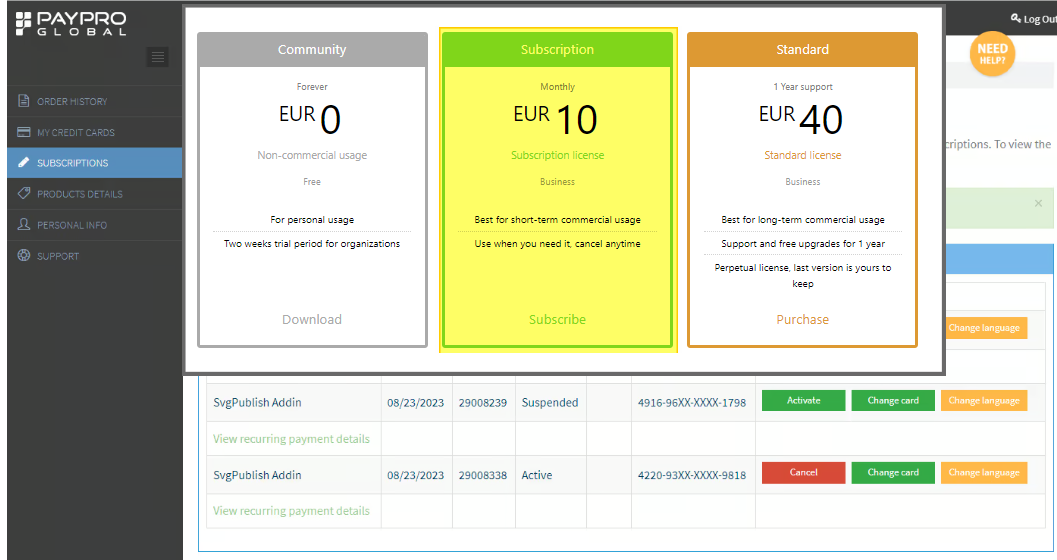
The previous (standard) plan remains unchanged, but now there’s an option to auto-renew support annually upon purchasing the Add-In. If you prefer not to have this feature, you can easily disable it during the purchase process. Regardless, the last version you get with the standard plan will always be yours to keep.
For guidance on managing your products and subscriptions, we’ve added an informative page detailing the use of our e-commerce partner, PayPro Global’s portal:
Manage Your Purchases and Subscriptions with PayPro Global
The Add-In’s product page:
Go to the Add-In’s Product Page
Continue reading“SvgPublish 1.5 release notes – subscription support”